Now available via IPv6

Quick Update - This site is now available via IPv6.

You don't have to do anything special, you will just use IPv6 if it is available and you have preferences for IPv6 connections.

If you want to test to see if you can get to the IPv6 site, try visiting http://v6.nullis.net

Published: 22 January 2012 # — Tags: ipv6

Steve, Thanks.

It was in High School that my passion for Technology, especially computing, was the most prominent. While I had dabbled with a few PC's and learned BASIC before then, it was High School I became intrigued even more, and was involved in setting up over 300 Macintosh PC's, from LC575's, PowerMac' to iMac's (Bondi Blue ones too!), and some G3's.

Having that experience definitely changed my Life Path, and opened a few more doors than would have been otherwise.

Update: Then again, the first PC I used at Primary School was an Apple IIe. It was the bomb.

And for that, I say: Steve, Thanks.

Steve Jobs, co-founder of Apple, passed today.

Published: 6 October 2011 # — Tags: apple, technology

Fall 2011 TV Shows - What I will be watching

Over the next month, is what the US TV Networks consider the start of their Fall Schedule, often this is when most of the dramas you have come to know and love start (NCIS, Friends, etc.).

So, I figured this would be a perfect time to look at, and discuss what shows I will be keeping an eye on during 2011-2012's Fall Schedule

The following are listed in alphabetic order, and are the shows that I will make an effort to watch at least the first few episodes of, and more if they turn out to actually be okay.

It is not uncommon that some of these series may even be pulled before that many episodes have aired. The network are getting better at picking what will succeed and what won't... but there is room for failure).

If you have any shows you think are worth watching, let me know via Twitter - @pwae.


Boss Logo

Boss

Overview: Mayor of Chicago, Kelsey Grammer, has been diagnosed with a neurological disorder and tries to plot his way to become the Governor of Illinois, while keeping his disorder a secret.

My thoughts: This is one I consider on the edge. If it stays on my to watch list for very long at all, will be a miracle. Giving it a chance.

More information: Boss on Wikipedia and Boss Trailer on Omelete (The video is available on Youtube, but only if you are in the U.S.).


Charlie's Angels Logo

Charlie's Angels

Overview: You know this drill, 3 girls, 1 guy and a voice on the end of a speaker box.

My thoughts: Remakes don't always go well, especially when the previous was such a hit (It worked for Hawaii Five-O didn't it?). Best of luck to these guys, they are going to need it.

More information: Charlie's Angels on Wikipedia and Charlie's Angels on Youtube.


Grimm Logo

Grimm

Overview: Cop Drama, where all the crimes relate back to a Grimm Brothers Story Tale (e.g. Little Red Riding Hood).

My thoughts: Has potential, but another TV Network has a story with almost the exact same story basis. Which one will be better?

More information: Grimm on Wikipedia and Grimm on Youtube.


Homeland Logo

Homeland

Overview: A lost at war spy, is found during a raid of another enemy site during another war conflict. He is bought home to be a hero, but some people think he has been turned, and is now a spy for the enemy.

My thoughts: Plot looks solid, and the trailer draws you in. Showtime have a history of having good shows around topics like this. (e.g. Sleeper Cell). Here's hoping it lives up to what's been hyped.

More information: Homeland on Wikipedia and Homeland on Youtube.


How to Be a Gentleman Logo

How to Be a Gentleman

Overview: Based on the non-fiction book by John Bridges, a comedic look at being a Gentlemen in the 21st Century with a story around it.

My thoughts: It's hard to find a real plot outline for this on the Internet. So let's just say, it's a comedy and hopefully funny. Probably won't last, unless it really hits the funny bone constantly.

More information: How to Be a Gentleman on Wikipedia and How to Be a Gentleman on Youtube.


I Hate My Teenage Daughter Logo

I Hate My Teenage Daughter

Overview: Two mothers who are trying to make sure their daughters aren't turning into the type of girls that tormented them at High School. But they slowly realise, they haven't done it all right.

My thoughts: Should be a good comedy, staring Jaime Pressly from My Name is Earl. The trailer sells it well, and I think it will last for a few seasons at least. Then again, maybe we are too overdone with family comedies?

More information: I Hate My Teenage Daughter on Wikipedia and I Hate My Teenage Daughter on Youtube.


Last Man Standing Logo

Last Man Standing

Overview: Tim Allen comes to realise the world is being overtaken by Women, and no longer is it a Man's World, it's a Women's World, especially with his wife and three daughters.

My thoughts: Tim the Toolman Taylor is back on TV! While he is going to be a big draw card for the Show, the show seems like a lot of the story line could be right from Home Improvement. Potential, at least 1 season, maybe 2.

More information: Last Man Standing on Wikipedia and Last Man Standing on Youtube.


Man Up Logo

Man Up

Overview: Three guys, who still want to be kids, decide it's time they grow up and act their age. But that's not as easy as you think.

My thoughts: I do love the opening to the trailer. If the rest of the show is like that, there is a chance of a season out of it. If it's not, gone before the first season is over.

More information: Man Up on Wikipedia and Man Up on Youtube.


New Girl Logo

New Girl

Overview: Zooey plays a well-liked, fun and cute woman in her late 20's. She unfortunately she had a sudden break-up with her boyfriend and is now looking for a new place to stay. She finds a place with 3 guys...

My thoughts: Like most of these shows, it has a lot of potential, and has already been nominated as one of the great new series for 2011. I hope it lasts, as I am dying to watch it after the trailer.

More information: New Girl on Wikipedia and New Girl on Youtube.


Once Upon a Time Logo

Once Upon a Time

Overview: Classic fairy tales come to life, but in the present day in the town of Storybrooke.

My thoughts: Remember how I said two networks had done TV Shows that sounded the same? Yep. this is the other one. Again, which one will actually be half-decent.

More information: Once Upon a Time on Wikipedia and Once Upon a Time on Youtube.


Penn & Teller: Tell a Lie

Overview: A 6-part series which will contain 6-7 stories per episode, one of which is a lie. Can you guess which one?

My thoughts: So Bullshit! is dead, and this is the new series (What happened Showtime?). I suppose there is just one question everyone has, will there be blatant nudity?

More information: Penn & Teller: Tell a Lie on Wikipedia and Penn & Teller: Tell a Lie on Youtube.


Person of Interest Logo

Person of Interest

Overview: A billionaire develops a computer program to predict people who are connected to a future violent crime. But he can't tell if they are the Perpetrator, the Victim or a Witness.

My thoughts: Not a very unique storyline, but definitely not a copy of another show directly. One of it's Execute Producers is J J Abrams, so it is worth a test, and looks quite interesting.

More information: Person of Interest on Wikipedia and Person of Interest on Youtube.


The Playboy Club Logo

The Playboy Club

Overview: Playboy is not a Club, it's a lifestyle. A story based on the first Playboy Club that opened in Chicago during the 60's, features the Man, the lifestyle and the Bunnies.

My thoughts: This is probably one of the most hyped series to be starting this Fall, and probably also the most controversial (maybe they never saw Californication?). It is worth watching and finding out if it's going to flop or not.

More information: The Playboy Club on Wikipedia and The Playboy Club on Youtube.


Prime Suspect Logo

Prime Suspect

Overview: Based on the British Series, it is the American version of a Crime Drama, based around a Female Detective, who is trying to make it in a male dominated Homicide department

My thoughts: UK Dramas that become US Dramas often fail. Exceptions exist, but failure is usually the answer. However the trailer for this one impressed me, and shows it could be damn good. Please don't stuff it up, and we will get a recurring series.

More information: Prime Suspect on Wikipedia and Prime Suspect on Youtube.


Terra Nova Logo

Terra Nova

Overview: Science Fiction drama which bases it on people from the year 2149, going back 85 million years in time, to start over, and save the human race from destruction.

My thoughts: One word, Dinosaurs. No one does a good series with Dinosaurs. Let's see if they can make it stick. Would be certainly different.

More information: Terra Nova on Wikipedia and Terra Nova on Youtube.


Unforgettable Logo

Unforgettable

Overview: A former NYC Detective who has a medical condition where she can remember everything. She is asked to help out Homicide, and ends up joining Homicide to help them with her special skills.

My thoughts: There is a possibility here. I hope this doesn't end up anything like what Medium did (you know, boring, repetitive, and did I mention boring?). Ten to one there is going to be an alternate love storyline in this one.

More information: Unforgettable on Wikipedia and Unforgettable on Youtube.


So, that's my idea on what will be good this season. Of these 16, there is a good chance we will only have a few of them left for a 2nd season. But then, that's how the cookie crumbles.

Published: 19 September 2011 # — Tags: shows, tv

Update on Microserver Build

Just in case you are wondering where the first post on the N36L build is, it has been unfortunately a bit delayed! There have been a few developments since the last post, that have been blockers to progress.

To start with, the RAM I initially purchased was incorrect, and now I know the difference the difference with regards to different types of ECC RAM! This is now resolved and I purchased some Corsair XMS3 RAM (2x4G), and will be using this RAM in the build.

Secondly, VMWare recently launched ESXi 5 for general availability. Previously I was going to use ESXi 4.1, but figured that using ESXi 5 would be good, as it had just been released. However, that said, ESXi 5 support in libvirt isn't there yet, so I am going to have to go back to using ESXi 4.1 as per the previous plan.

I'll try and get the build post, with photos up in the next 2 weeks.

Hang in there, it won't be long!

Published: 11 September 2011 # — Tags: linux, n36l

Motorola Mobility has been acquired by Google

Seems google have done the impossible.. well.. what was thought of as the impossible, anyway.

They have purchased Motorola Mobility (Motorola's Mobile Phone Arm), for $12.5billion

The buy is mostly for all the Patents, but should also be scaring the likes of HTC, Samsung and etc at the moment.

Published: 16 August 2011 # — Tags: android, google

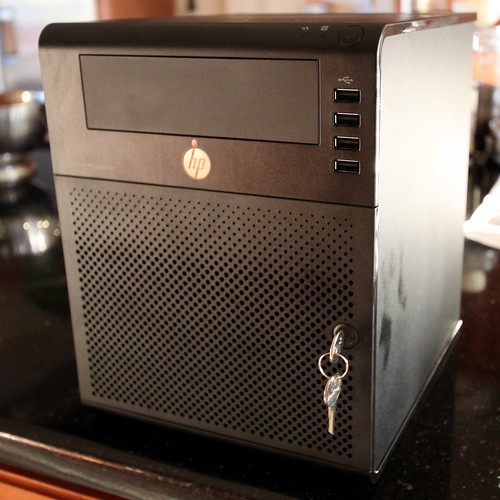
My recent purchase - HP Microserver N36L

About a month ago I ordered a HP Proliant N36L, commonly known as the HP Microserver. I had been looking to replace my aging P3-900mhz Gateway and all-round utility server for quite some time, and when I saw this on special for only $200, I knew this was going to be the perfect replacement.

With the ability for it to have the system boot off an Internal USB device, being able to take up to 8GB of DDR3 RAM, and have 8TB of hard drive space, it will be able to meet the requirements of the current box, and add on a few new abilities in the process.

While I have been waiting for it to arrive, I figured that this would be a good opportunity to do a few guides about the configuration of the machine, both at a Hardware and Software level, and be able to provide a few guides to virtualisation.

Hardware wise, the current plan for the server I have will be to do the following upgrades:

  • Change the standard 1GB of Ram to 8GB of ECC Ram;
  • Remove the 250GB hard drive that comes with it, and replace it with 4 x 2TB hard drives;
  • Into one of the PCI Express ports, add on an additional Network Card (NIC), which will take the machine from 1 Ethernet Interface to 3; and
  • Add in a USB Drive to the internal USB Slot to give us a 16GB System disk, that will provide fast access for the system (and hopefully provide a quick boot).

Software wise, I want to have a go and setting this machine up as a Virtual Machine Host, using Virtual Machine Platforms such as Xen, VMWare ESXi and KVM.

Once we have the machine built up from the base, I will then use the opportunity to go over some other deployment and centralised configuration tools. One example of this will be Puppet.

And so, after quite a long wait, the Microserver finally arrived today.

So in the next few days (possibly the weekend), I will kick off with the first article on this series. If you have any suggestions of things you would like to see done with this box, drop us a line via twitter, and I'll try and give it a go for you.

Image from Flickr, by Samat Jain. Used under a Attribution-ShareAlike 2.0 Generic (CC BY-SA 2.0)

Published: 9 August 2011 # — Tags: linux, n36l

Configure iSCSI with Solaris 10 to a Dell PowerVault

The other day I had to allocate some SAN Space from a Dell PowerVault MD3000i to a Solaris 10 server, and was amazed that not only do DELL consider Solaris an unsupported platform for connecting to their devices, but the general level of documentation around iSCSI and Dell is pretty low.

So I've decided to document what I did to set it up.

This guide will presume that you have already configured the Virtual Disk, and allocated it to this machine via the DELL SAN Configuration Tool. Additionally, the below steps were for a Solaris Sun Fire V120 running Solaris 10 (120011-14), so your mileage may vary.

Configure your Network Interface

To use your SAN correctly, you should place your SAN connection on a separate network to your normal network traffic. This not only helps keep things secure and separate, but cuts out network congestion you want to avoid so that your SAN response times are fast.

If you aren't using a separate network connection, then jump to the next step.

Step 1 - Pre-config

Start by determining the interface you are going to configure for the SAN. In this example, mine will be eri1 (the primary interface is eri0). Also determine the IP you will be allocating to this machine for that interface and a hostname for this interface. We will use 192.168.1.11 and server123i.

Next, you will need to configure a couple of files with the settings for this interface.

Step 2 - Create /etc/hostname.interface

Create a new file called /etc/hostname.eri1 and the only thing to be in this file, is the hostname you determined above (server123i).

# cat /etc/hostname.eri1
server123i

Step 3 - Add entry to /etc/hosts

Add a new entry to /etc/hosts mapping your new hostname, to it's IP.

# grep server123i /etc/hosts
192.168.1.11 server123i

Step 4 - Add entry to /etc/netmasks

Add a new entry to /etc/netmasks to store the correct netmask for this IP address range.

# grep -v '^#' /etc/netmasks
10.0.1.0       255.255.255.0
192.168.1.0    255.255.255.0

Step 5 - Restart networking service

Restart the networking service to have Solaris reload the settings for the interface.

# svcadm restart network/physical

Step 6 - Check your interface is now available

If all went well, you will now have your interface, eri1 configured with the IP you specified, and in the UP state.

# ifconfig eri1
eri1: flags=1000843<UP,BROADCAST,RUNNING,MULTICAST,IPv4> mtu 1500 index 3
        inet 192.168.1.11 netmask ffffff00 broadcast 192.168.1.255
        ether 0:f:4d:a4:c4:9e

Configure iSCSI on Solaris

This bit isn't too difficult, but there are some extra steps as we have to work around the DELL PowerVault not working 100% as it should, with Solaris.

Step 1 - Enable Solaris iSCSI Initiator

First we need to check if the iSCSI Initiator service is running. If it isn't, then we need to enable it.

# svcs -a |grep iscsi
disabled       Jun_22   svc:/network/iscsi_initiator:default
disabled       Jun_22   svc:/system/iscsitgt:default

# svcadm enable svc:/network/iscsi_initiator

# svcs -a |grep iscsi
online         15:10:00 svc:/system/iscsitgt:default
online         15:15:10 svc:/network/iscsi_initiator:default

Step 2 - Add Discovery Address

Next, we need to tell iSCSI Initiator where our SAN is (Discovery Address). In our example, we will use 192.168.11.1 on port 3260.

# iscsiadm add discovery-address 192.168.11.1:3260

Step 3 - Enable iSCSI Discovery

At this point, if we were to do this with Auto Discovery (SendTargets Discovery) with iSCSI, we would just have to do iscsiadm modify discovery -t enable and our disk and SAN would automatically be found, and the Virtual Disk created as a Device (/dev/rdsk).

However, as this doesn't work, we have to use Statically Assigned Targets. To do this, we first need to get a list of all targets we can see.

# iscsiadm list target -v
Target: iqn.1984-05.com.dell:powervault.md3000i.8a4badb0ba454aa1000000004c1f8e4a
...
    IP address (Local): 192.168.11.1:32812
    IP address (Peer): 192.168.11.1:3260

Now that you have the target, you can add this address into the iSCSI Static Config. Note: at the end of the target name in the below, you need to add a comma, followed by the IP Address.

iscsiadm add static-config iqn.1984-05.com.dell:powervault.md3000i.8a4badb0ba454aa1000000004c1f8e4a,192.168.11.1

Step 4 - Configure DELL PowerVault SAN

After we have done this, if you haven't previously, now is a good time to go and configure the Virtual Disk and Server on the DELL SAN Configuration Tool, otherwise the next steps will fail.

Once this is done, move onto the next step.

Step 5 - Enable Static Discovery

Now that you have Solaris configured and the SAN configured, you now need to turn on Static Discovery. To do this:

iscsiadm modify discovery -s enable

Once this is done, you should take a look at dmesg and you will notice that you have some messages towards the end about your disks coming online.

iscsi: [ID 240218 kern.notice] NOTICE: iscsi session(40) <target> online
scsi: [ID 799468 kern.info] sd2 at iscsi0: name <target>,0, bus address <target>,0
genunix: [ID 936769 kern.info] sd2 is /iscsi/disk@0000<target>,0
scsi: [ID 107833 kern.warning] WARNING: /iscsi/disk@0000<target>,0 (sd2):
         Corrupt label; wrong magic number
genunix: [ID 408114 kern.info] /iscsi/disk@0000<target>,0 (sd2) online
scsi: [ID 799468 kern.info] sd3 at iscsi0: name 0000<target>F,31, bus address 0000<target>,31
genunix: [ID 936769 kern.info] sd3 is /iscsi/disk@0000<target>,31
scsi: [ID 107833 kern.warning] WARNING: /iscsi/disk@0000<target>,31 (sd3):
         Corrupt label; wrong magic number
genunix: [ID 408114 kern.info] /iscsi/disk@0000<target>,31 (sd3) online

The above shows two things. It shows that your disk has come online (,0) and that the DELL Universal Xport has come online (,31). The error messages about 'Corrupt label; wrong magic number' are safe to ignore, as our disk hasn't been formatted.

To see more details about the disks that have been mounted, you can get this by using the command iscsiadm list target -S. This will tell you the /dev/rdsk nodes associated with your disk(s), among a few other details.

Step 6 - Finishing Up - Partition and Format

Now that you have your disk showing up, you can simply use format and newfs (or however you wish), and use this disk for your need. This disk with work the same as a physical disk attached to the system.

Credits for some of the points in here to the following articles, I have simply tried to join it all into one article.

  1. iSCSI Troubleshooting
  2. comp.unix.solaris thread at Google Groups
  3. Connecting to an iSCSI Target with Open-iSCSI Initiator using Solaris
Published: 10 July 2011 # — Tags: solaris

IP sets in 2.6.39

Apply rules in iptables against a table, instead of adding a rule for every host that applies.

Will simplify rules about 300%. Now if only we could get a full working model of PF in Linux.

Published: 21 May 2011 # — Tags: linux

Linux World Map

Quite well done, in the style of the XKCD Community Map. Big Enough to have as a new desktop Wallpaper too.

Published: 21 May 2011 # — Tags: funny, linux

TermKit - Interesting Idea

But it's probably not going to work in reality. Would be curious to see it built upon a bit more tho.

Worth checking out for the read.

Published: 19 May 2011 # — Tags: